- Feb 5, 2026
- 4 min read
Raspberry Pi, Mini PC or Cloud VPS? I Measured Them
Measured in 2024, revisited now: what the numbers showed, and what I’d choose today.
By 2024 I was self-hosting small apps, like my trip planner, on a mix of hardware: Raspberry Pis, an Orange Pi 5, a small Intel mini PC, and a Hetzner cloud server I’d started trying. Everyone online had an opinion about which is “best”. I wanted numbers from my own workloads.
The contenders
| Device | CPU | RAM | Size |
|---|---|---|---|
| Raspberry Pi 4 | 4× Cortex-A72 | 2 GB and 4 GB | 0.08 L |
| Orange Pi 5 | 4× Cortex-A76 + 4× Cortex-A55 | 8 GB | 0.11 L |
| BMAX B4 mini PC | Intel N95, 4 cores | 16 GB | 0.6 L |
| Hetzner cloud | shared Skylake vCPUs (2 or 4) | 4 or 8 GB | someone else’s rack |
A friend shared results from his Raspberry Pi 5 (8 GB) for one of the tests.
Power: what it costs to leave on
Measured at the wall with a smart plug:
| Device | Idle | Max seen | Yearly cost, idle 24/7 |
|---|---|---|---|
| Raspberry Pi 4 | 2–3 W | 6 W | ~$5 |
| Orange Pi 5 | 3–5 W | 8 W (80 °C) | ~$8 |
| BMAX B4 | 9 W | 18 W (64 °C, fan) | ~$14 |
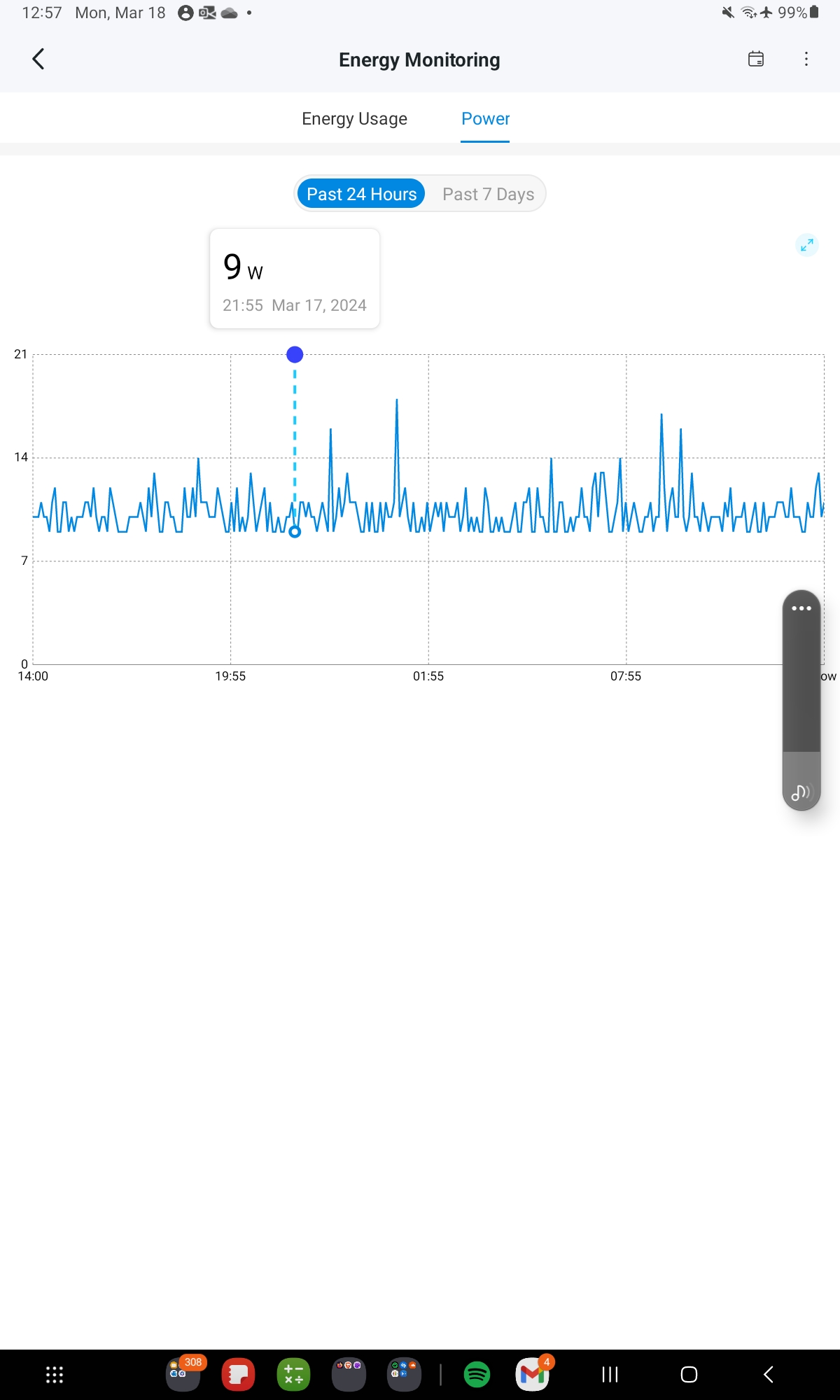
That’s at about $0.20 per kWh:
yearly kWh  = idle watts × 24 × 365 / 1000
yearly cost = yearly kWh × price per kWh
Two small findings: turning off Wi-Fi saved about 10% (~1 W) on the mini PC, and the cheapest always-on board costs about as much per year as a small cloud server costs per month.
Speed: the build that told the truth
Synthetic benchmarks were noisy. The useful test was a real job: building the trip planner’s Docker image, a Python app with scientific libraries.
| Device | Docker build |
|---|---|
| Raspberry Pi 4 (2 GB) | ~61 min |
| Raspberry Pi 4 (4 GB) | ~58 min |
| Orange Pi 5 | ~30 min |
| Hetzner, 2 shared vCPU | ~77 s |
| BMAX B4 (N95) | ~45 s |
| Hetzner, 4 shared vCPU | ~45 s |
Same Dockerfile. An hour on a Pi, 45 seconds on a small Intel mini PC.
Part of the gap had a cause I didn’t expect: during the builds the ARM boards were mostly using a single core (25% and 13% CPU). My best explanation now: many Python packages ship ready-made wheels for x86 but, back then, often had to be compiled from source on ARM. The N95 and the cloud servers download a wheel; the Pi compiles it, one package at a time.
A second build, of a different project, narrowed the gap: Orange Pi 5 5 min 20 s, Pi 5 4 min 30 s, Pi 4 10 min 7 s, Hetzner 6 min 15 s. Download speed may have mattered as much as the CPU there, and my friend’s internet connection was faster than mine. What you build matters as much as where.
What the numbers say
- For running small services, a Pi is hard to beat: a few watts, about $5 a year, silent. Most self-hosted apps sit idle almost all the time.
- For building images or anything CPU-heavy, x86 wins by an absurd margin, mostly because of prebuilt packages. Don’t build on the Pi; build elsewhere and pull the image.
- For GPIO and sensors, the Raspberry Pi wins outright, on hardware and on software support. The Orange Pi needed third-party OS images to get things like HDMI working.
- For anything public-facing with a traffic spike risk, a cloud server’s network and uptime are worth paying for.
What I’d choose today
- One quiet x86 mini PC as the main box. 9 W idle is about $14 a year, and it builds in seconds what a Pi builds in an hour.
- Pis where there’s hardware to talk to: sensors, cameras, GPIO.
- Build images in CI (multi-architecture, pushed to a registry) and only pull them at home. The device that runs the app shouldn’t have to compile it.
- A small VPS only for what genuinely needs to be reachable and always up.
- Measure your own workload. My Pi was “slow” at building and perfectly fast at serving. Both were true.
Takeaways
- Idle power is the cost that matters for always-on hardware.
- Benchmark with a real job, not a synthetic score.
- ARM was slow at building Python images, likely because of source builds, not just the CPU.
- Split the roles: build in CI, run on low-power hardware, rent only what must be public.